The Budget screen
What the month is allowed to cost, and whether it is going to hold.
The screen answers one question first: how much can I still spend. Everything else on it is there to qualify that figure.
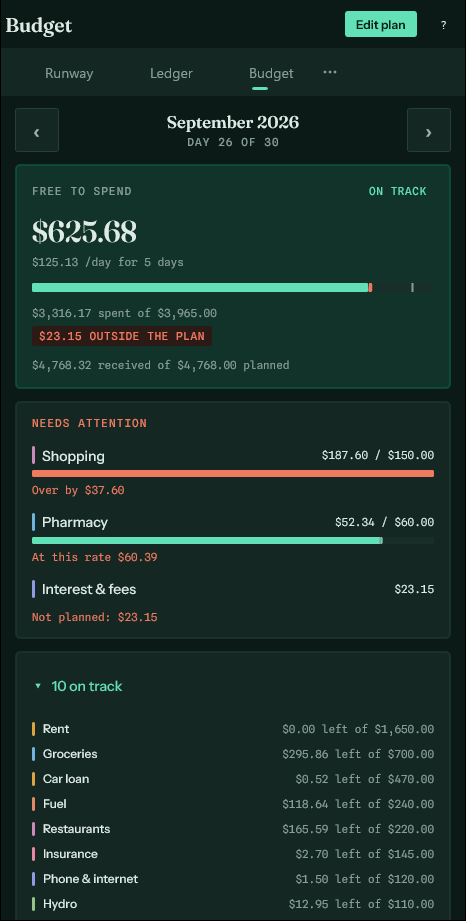
Free to spend#
The plan, less what has gone, less what is already committed, less anything that went out under a category you did not plan for. All four come off because none of it can be spent twice — the rent dated the 28th is not yours to spend, and neither is the money that has already left.
Under it, the same figure as a daily allowance, which is the form the question takes when you are standing at a till.
The bar shows those subtractions in order: what has been spent, what is still due, and what went out outside the plan, each in its own colour and each named as a figure underneath. The mark across it is where the plan says you should have reached by today — not simply how far through the month you are, because a month whose rent leaves on the first is two thirds spent by the second. Fill short of the mark is ahead; fill past it is behind.
Needs attention#
Only the categories asking for a decision, worst first: already past their plan, already committed past it, heading past it at the current rate, or spending money under no plan at all. Everything behaving is listed below with what is left of it.
Tap any line to change what that category may cost this month.
Editing the plan#
Edit plan, in the bar at the top, opens the form: one line per category, and a running total against your expected income, so you can drive the month to zero if that is how you work. Done takes you back.