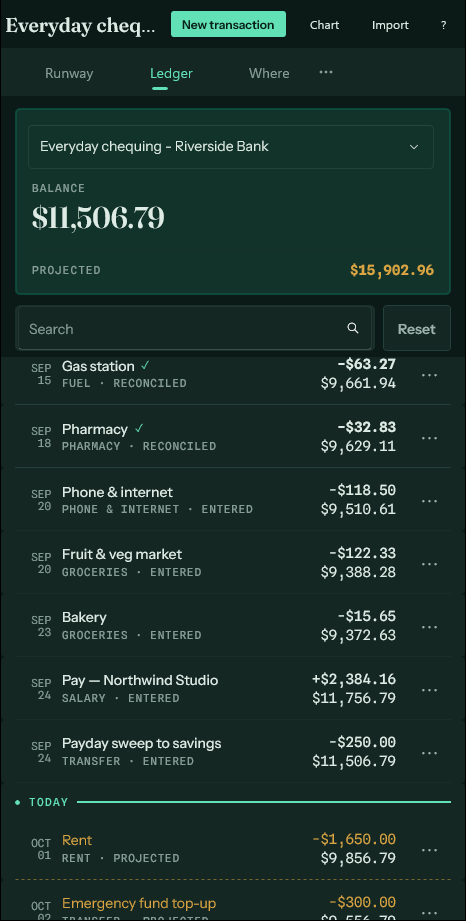
Forecast, entered, reconciled
Three kinds of certainty, drawn three different ways.
Every figure in the app is one of three things, and you can tell which by looking at it.
- Forecast. Dated after today. A recurring payment says it will happen. Drawn light, in brass, under a dashed rule — so no one mistakes the runway for a bank balance.
- Entered. In the past, but nothing has confirmed it. Typed by you, or a forecast that has since come due. Ordinary weight and ink: true as far as anyone knows, but the app is not vouching for it.
- Reconciled. Matched against a bank statement. Full weight, and a tick. This is the only kind the app will state without hedging.
An entry moves from one to the next on its own as the date passes and as statements are imported. Nothing needs marking by hand.
An entered row dated before the account's most recent reconciled entry is highlighted in red, with a bar down its left edge and a warning sign instead of a tick. A statement has already been checked past that date and did not confirm it, so it is worth a look: a cheque not yet cashed, a duplicate of a line the import added as new, or a mistake. An entry on the same day as the last reconciled one is not flagged, since it may simply not have posted yet. The balance panel says how many there are, and Next beside the count brings each one on screen in turn.