Moving money between your own accounts
One movement, written into both ledgers, and kept as one thing.
Money you move from chequing to savings has not been spent and has not been earned. It has changed places. That is why a transfer is entered once rather than typed into two accounts separately: the app writes both halves for you, and from then on treats them as one movement.
Making one#
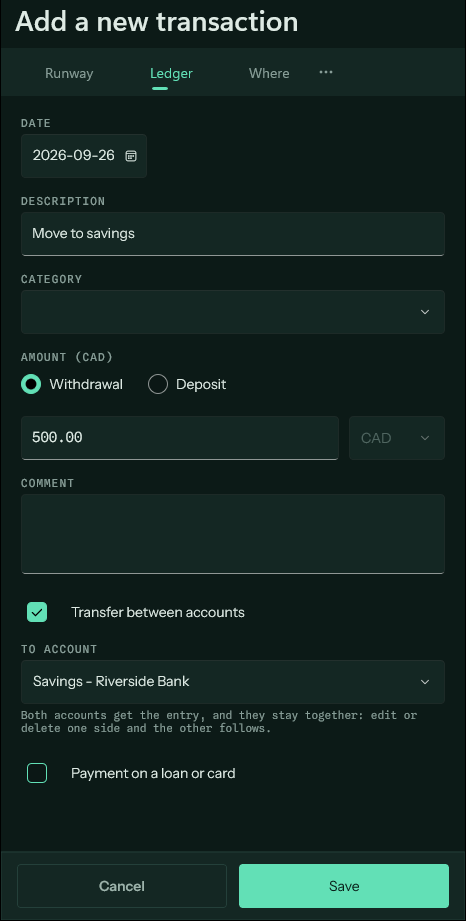
On the Ledger, add an entry as usual, choose whether the money is leaving or arriving, then tick "Transfer between accounts" and name the other account. Both accounts get the entry the same day, for the same amount, facing opposite ways.
Edit either half afterwards and the other follows. Delete either half and both go. Untick the box and the far side is removed rather than left stranded.
Making one automatic#
The payday sweep into savings, the monthly top-up of the account the bills come out of — anything that repeats belongs on the Due screen. Add a recurring payment, tick "Automatic transfer", and name the account the money lands in.
From then on both ledgers are filled in ahead of time: the money leaves one forecast and arrives in the other on the same day, so neither account is quietly wrong about what it will hold next month. Pause it, change the amount, or point it at a different account, and both sides are rebuilt to match.
What they are left out of#
Transfers do not appear in Where, in the Budget, or in the month's outgoing total. None of those measure money moving — they measure money spent and money earned, and a transfer is neither. Left in, the more carefully you moved money between your own accounts the more the app would report you spending.
They still move balances, because a balance is exactly the thing a transfer does change. Runway and the account totals count them in full.