Credit cards, and when they actually end
Why the minimum never finishes, and what any other figure would do instead.
A card is a loan with the two things that make a loan comprehensible taken away. There is no amount borrowed, only a balance that moves, and there is no term, only a payment. So the date the debt ends — the one figure worth knowing — is on no statement anywhere, because it depends on a decision you have not made yet.
Enter what you owe now, the date that was true, and the rate the issuer quotes. After that the balance is not typed again: purchases raise it and payments lower it. Cards charge interest daily, which costs slightly more than dividing the rate by twelve; there is a switch for it, on by default.
The minimum, and why it matters#
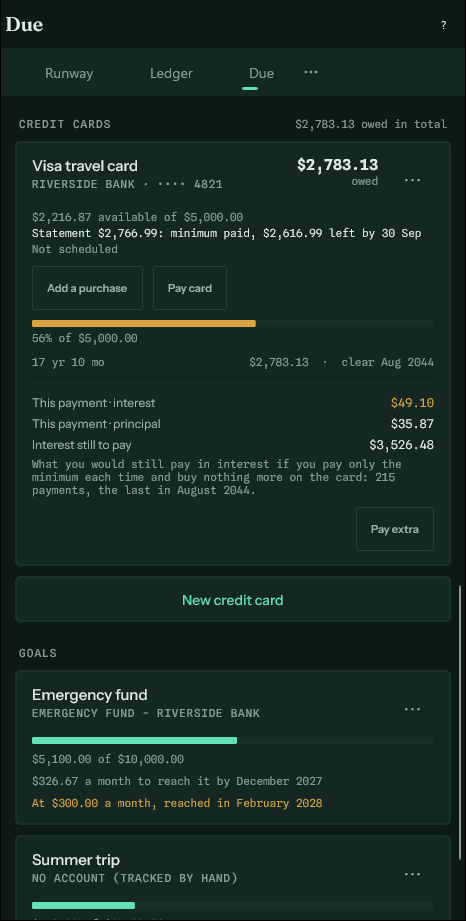
The minimum is a percentage of what you owe — usually two to five percent — with a small floor under it. Because it is a percentage, it falls as the balance falls, and the balance falls more slowly every month as a result. Five thousand dollars at twenty percent, paid at three percent a month, takes about twenty years and costs more in interest than the original debt.
That is not a quirk. It is what the arrangement is for. The app states the number rather than leaving it implied.
Paying a fixed amount instead#
Choose a fixed amount and the same debt behaves like a loan: the payment does not shrink, so every month takes a larger bite. The card then shows both futures side by side — what your figure comes to, and what the minimum alone would have.
If what you type is below the minimum, the app says so. An issuer will take it and charge a fee for it.
Owed, available, and due#
Each card on Due shows three figures, and they answer different questions.
- Owed is everything on the card right now, including what you bought yesterday.
- Available is the limit less what is owed: what you can still spend.
- Due is the next payment and its date. On a card paid at the minimum it is what the issuer asks for; it gets smaller as the balance does.
The total above the cards adds up what they all owe. It is never taken off the money on the Runway. Cash is what is in your bank accounts; a card balance is money you owe, and the two are kept apart.
Purchases#
Add purchase opens the usual entry form on the card, set to Purchase. Give it a category and it counts in Where and the Budget like any other spending — a $100 grocery bill on the card is $100 of groceries. No bank balance moves.
A refund is the same form set to Payment or refund, with the category the purchase had: what is owed goes down, and so does what the category shows as spent. Interest and fees are purchases too, under a category of their own.
The card's purchases and payments are also on the Ledger tab, after your bank accounts, under the card's name. Show purchases and payments in the card's menu takes you there. Statements can be imported into it like any account's.
Paying the card#
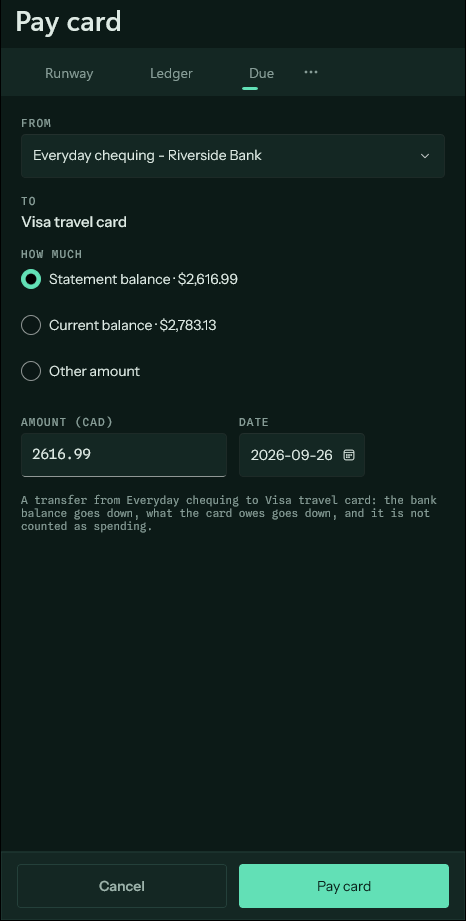
Pay card asks where the money comes from and how much: what is owed now, the minimum, or another amount. It writes one transfer — out of the bank account, onto the card — so the bank balance falls, what is owed falls by the same amount, and none of it counts as spending. The purchases already did.
That is why paying a card never doubles anything. Buy $100 of groceries, pay the card $100, and the budget still shows $100 of groceries. Pay only $50 and the card still owes $50; groceries are still $100.
A payment dated after today is planned, and the app asks how it counts: instead of that month's minimum, or on top of it. Nothing is chosen for you. A planned payment you have not answered for is left out of the payoff and interest figures, and the card on Due asks about it until you do.
If the schedule already has this period's payment on its way, Pay card offers to stand in for it, so the bank account does not lose the money twice.
Book the payments into an account, under Scheduled payments on the card's form, puts every future payment in your bank account's ledger ahead of time, so the Runway sees it coming. It is on for a new card, and each payment is worked out again whenever what is owed changes.
Statements#
A statement is what the issuer says was owed on the day the period closed. It is not what is owed now: anything bought since belongs to the next statement. That is why a card can show $1,000 owed and a $800 statement at the same time — the other $200 was spent after the statement closed.
Record a statement from the card's menu: the closing date, the balance, when payment is due and the minimum. Importing a card's statement file keeps its closing balance for you; add the due date and minimum yourself, since the file does not carry them.
The card then shows the statement on Due in words — due on a date, minimum paid, paid, or overdue — and Pay card offers the statement balance, less what you have paid since it closed.
Checking a statement#
The statement screen compares the statement with your own entries on the card up to its closing date. When they agree, it offers to mark those entries as matched. When they do not, it says by how much and which way, and lists the period's entries so you can find the purchase that is missing, the one entered twice (two on the same day for the same amount are flagged), or the amount typed wrong.
If you cannot find it, you can book the difference as an adjustment. It moves what the card owes without being counted as spending.
Card payments in a bank statement#
When you import your bank statement, the app looks for payments to your cards and files them as transfers rather than spending. It does not assume any particular card: it recognises each of yours by its name, its bank, its last four digits and its card type — Visa, Mastercard, American Express and the others, or a store card — and, best of all, by how your bank described your earlier payments to it. A card type only counts on its own when you have a single card of that type.
A line the app is sure of is set to Card payment. One it is only fairly sure of stays as spending, with a note saying which card it could be; choose Card payment in its list to file it that way. Importing the card's own statement pairs its payment lines with the bank-side ones, so each payment is one transfer, not two entries.
Reminders, when they are on, include card statements: a few days before the due date, and once after it if the minimum has not been paid. A statement already paid is not mentioned. You can switch card reminders off on their own in Setup.