Recording an entry by hand
A purchase, a deposit or a transfer, typed in rather than imported.
Most entries arrive by importing a statement, but anything can be typed in: cash spent at a market, a cheque you have written and that has not cleared, a payment you know about before the bank does.
- On the Ledger screen, pick the account at the top.
- Choose New entry.
- Say whether the money is a withdrawal (leaving) or a deposit (arriving).
- Fill in the date, a description, a category and the amount. A comment is optional.
- Save. The entry takes its place in the list, and the running balance after it is worked out again.
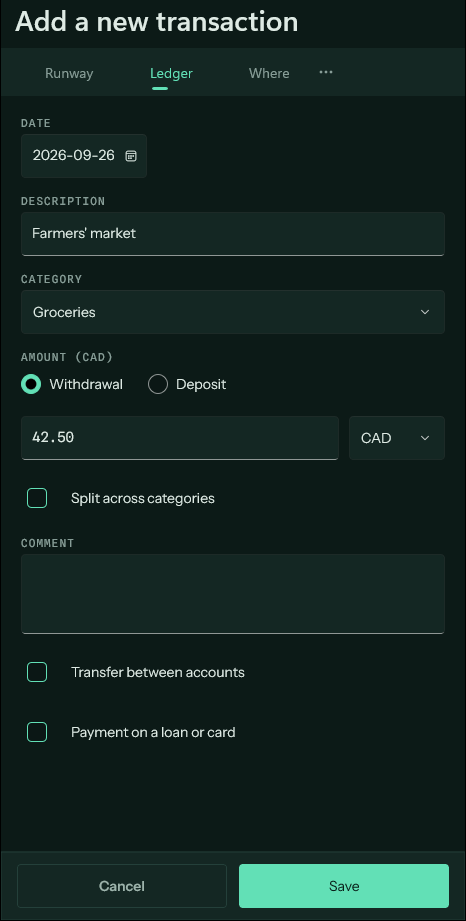
Dates in the future#
An entry dated after today is a forecast, drawn light in brass like a scheduled payment. It counts in the Runway from the day it falls. Something that repeats belongs on the Due screen instead, where it is written ahead of time for you.
Paying a loan or a card#
Tick Payment on a loan or card and choose which debt. The amount comes off what that loan or card still owes, and the form says where the money goes. To pay a credit card from a bank account, Pay card on the Due screen does the same in one step.
Changing or removing one#
Tap an entry to open it again, change anything, and save. Deleting one is among the row's actions.
- A transfer is two halves that stay together: edit one and the other follows, delete one and both go.
- An entry that a statement has reconciled is the bank's figure. Change it only if the bank did.
Entries in another currency#
Pick the currency beside the amount and type what the receipt says. The form then asks what the account was actually charged, which is the figure the balance uses.