Accounts, and which kind to choose
What each account type means, and which totals it counts in.
An account is anything that holds a balance you want to follow: a bank account, a wallet of cash, a brokerage account, even the house. The type you give it decides which totals it counts in, so it is worth a moment's thought.
Money you can spend#
- Checking, Savings and Cash are money that can meet a bill this month. They are what the Runway adds up, and what the low point is worked out from.
Things you own#
- Investment is a brokerage, retirement or other invested account: owned, but not spendable this month.
- Property or other asset is something owned that is not money at all, like a house or a car.
Both count in net worth and are left out of the Runway. Their balance moves when you tell the app what they are worth now, with Update value in the account's menu, rather than by spending.
Money you owe#
- Other debt is money owed with no loan terms behind it, such as a sum borrowed from a relative. It counts in net worth, not in the Runway.
- Loan account is a loan you want to reconcile against the lender's statements, like any bank account.
A loan with a rate and a term, whose payments the app should work out for you, belongs on the Due screen instead. Keep each loan in one place: a loan entered both ways is counted twice in net worth.
Credit cards are not created here either. Add a card on the Due screen; the app gives it a ledger of its own and keeps it apart from your bank accounts.
Your first account#
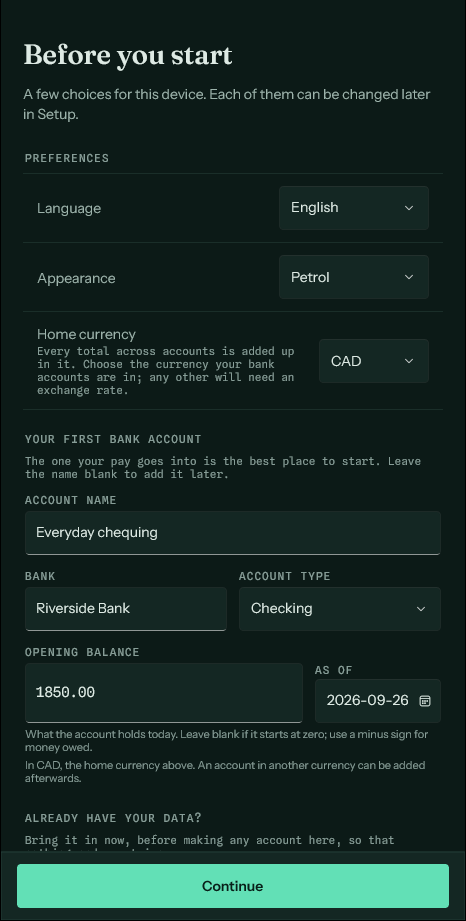
The first launch offers to make one bank account there and then, on the same screen as the home currency, and in that currency. The one your pay goes into is the best place to start. Only Checking, Savings and Cash are offered there: a card, a loan or a house each has its own form. Leave the name blank to skip it and add accounts later.
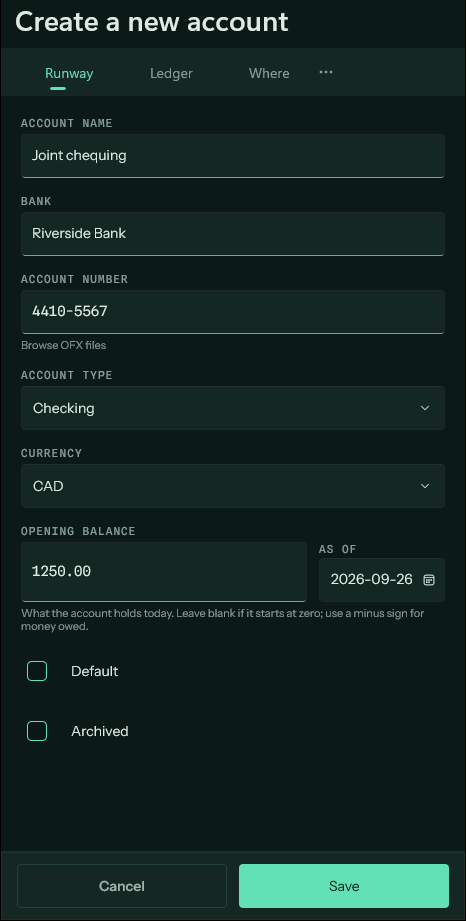
Every other account is added from the Runway screen, with the full form below.
The opening balance#
When you create an account, enter what it holds today and the date that was true. Leave it blank if the account starts at zero; use a minus sign for money owed. The opening balance is recorded as a valuation, so it moves the balance without being counted as income.
Every projection starts from this figure, so it is worth getting right. If it turns out to be off, correct it rather than adding an entry to make up the difference.
Currency#
Each account holds one currency, chosen when it is created. Pick the one the bank keeps it in. An account in a currency other than your home currency needs an exchange rate before it can count in any total.
Closing an account#
Tick Archived on the account's form when you close it at the bank. Its entries are kept, and it stops appearing among your open accounts.